> ## Documentation Index
> Fetch the complete documentation index at: https://docs.nadles.com/llms.txt
> Use this file to discover all available pages before exploring further.
# Request and response transformations
> API-scoped modifications of requests and responses.
## Overview
Transformations allow you to dynamically modify requests and responses. That includes headers, query string parameters and body.
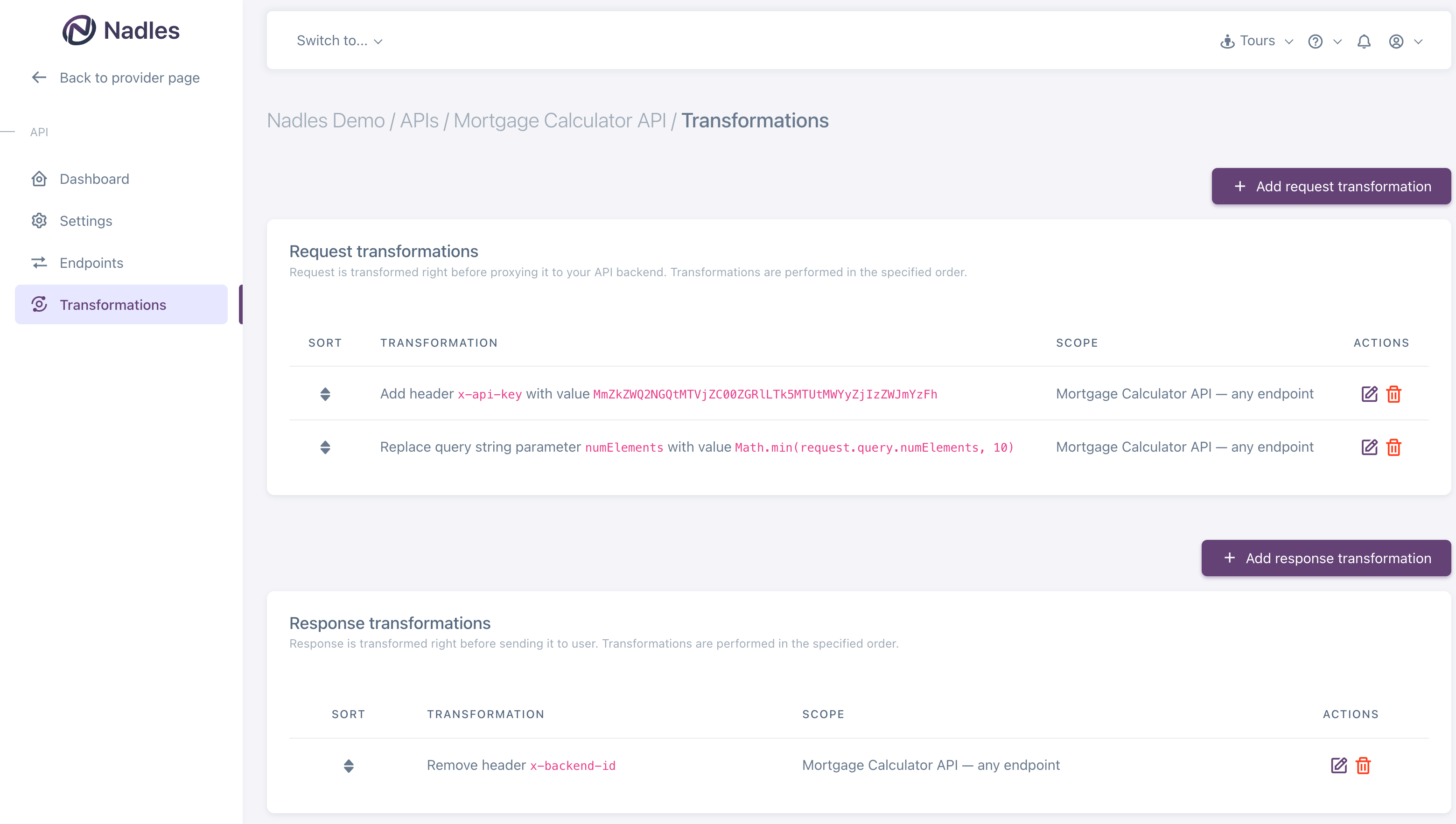 This section describes API-scoped transformations.
Transformations defined on an API level are applied to requests/responses to that API, regardless of the product the customer is subscribed to.
Transformations defined on an API level are always applied first.
Read about [product-scoped transformations](/products/transformations).
One of the use-cases for transformations is to authenticate Nadles API Gateway in your API backend by API key. Learn how to [configure Nadles to send an API key to your backend](/api-management/securing-your-backend).
## How it works
```mermaid theme={null}
graph TD
input[\"GET /endpoint1"/]
apply_api_req_tfs[Apply API-level request transformations]
apply_product_req_tfs[Apply product-level request transformations]
proxy_and_wait(("Proxy modified request
and wait for response"))
apply_api_resp_tfs[Apply API-level response transformations]
apply_product_resp_tfs[Apply product-level response transformations]
send_response[\\Send modified response to the user/]
input --> apply_api_req_tfs
apply_api_req_tfs --> apply_product_req_tfs
apply_product_req_tfs --> proxy_and_wait
proxy_and_wait --> apply_api_resp_tfs
apply_api_resp_tfs --> apply_product_resp_tfs
apply_product_resp_tfs --> send_response
```
To configure transformations, navigate to **APIs → select API → Transformations**.
## Headers
The transformation will add/replace/remove headers in a request or response.
Header names are **case-insensitive**.
### Add
Adds a new header, even if there is already one with the same name.
**Example**
Original request:
```
GET / HTTP/1.1
X-Some-Header: some-value
```
Transformation:
```
Add header "X-Some-Header" with value "another-value".
```
Transformed request:
```
GET / HTTP/1.1
X-Some-Header: some-value
X-Some-Header: another-value
```
### Replace
Replaces header(s) with a new value.
If there are several headers with the given name, they're removed and replaced with the new value.
**Example**
Original request:
```
GET / HTTP/1.1
X-Some-Header: first-value
X-Some-Header: second-value
```
Transformation:
```
Replace header "X-Some-Header" with value "third-value".
```
Transformed request:
```
GET / HTTP/1.1
X-Some-Header: third-value
```
### Remove
Removes all headers with the given name.
**Example**
Original request:
```
GET / HTTP/1.1
X-Some-Header: first-value
X-Some-Header: second-value
```
Transformation:
```
Remove header "X-Some-Header".
```
Transformed request:
```
GET / HTTP/1.1
```
## Query string parameters
The transformation will add/replace/remove query string parameters in a request.
Query string parameter names are **case-sensitive**.
### Add
Adds a new query string parameter, even if there is already one or more with the same name.
**Example**
Original request:
```
GET /?param1=100 HTTP/1.1
```
Transformation:
```
Add query string parameter "param2" with value "test-value".
```
Transformed request:
```
GET /?param1=100¶m2=test-value HTTP/1.1
```
### Replace
Replaces query string parameter(s) with a new value.
If there are several query string parameters with the given name, they're removed and replaced with the new value.
**Example**
Original request:
```
GET /?param1=100 HTTP/1.1
```
Transformation:
```
Replace query string parameter "param1" with value 200.
```
Transformed request:
```
GET /?param1=200 HTTP/1.1
```
### Remove
Removes all query string parameters with the given name.
**Example**
Original request:
```
GET /?param1=100 HTTP/1.1
```
Transformation:
```
Remove query string parameter "param1".
```
Transformed request:
```
GET / HTTP/1.1
```
## Body
The transformation will add/replace/remove request/response body.
### Add
Adds a new body. If a request or response already has a body, it's left unchanged.
**Example**
Original request:
```
POST / HTTP/1.1
```
Transformation:
```
Add body with value {"testkey": "testvalue"}
```
Transformed request:
```
POST / HTTP/1.1
{"testkey": "testvalue"}
```
### Replace
Replaces the body with a new value. If there is no body yet, it's added.
**Example**
Original request:
```
POST / HTTP/1.1
{"originalkey": "originalvalue"}
```
Transformation:
```
Replace body with value {"newkey": "newvalue"}
```
Transformed request:
```
POST / HTTP/1.1
{"newkey": "newvalue"}
```
### Remove
Removes the body.
**Example**
Original request:
```
POST / HTTP/1.1
{"key": "value"}
```
Transformation:
```
Remove body.
```
Transformed request:
```
POST / HTTP/1.1
```
## Expressions
### JavaScript
You can use JavaScript expressions in your transformations to make them even more dynamic.
Expressions must evaluate to a new string value for the header/query string parameter/body.
#### Examples
**Example — News API**
Say, you provide an API endpoint that returns contents of a news article. E.g.,
```json theme={null}
{
"id": "b6355c53-44a3-464b-bc9e-759749cdb3ec",
"title": "The title",
"content": "Some long article body"
}
```
For your "Free" product, you'd like to return only the first 120 characters of article body.
With the following transformation added to the "Free" product, you configure Nadles API Gateway to do that:
This section describes API-scoped transformations.
Transformations defined on an API level are applied to requests/responses to that API, regardless of the product the customer is subscribed to.
Transformations defined on an API level are always applied first.
Read about [product-scoped transformations](/products/transformations).
One of the use-cases for transformations is to authenticate Nadles API Gateway in your API backend by API key. Learn how to [configure Nadles to send an API key to your backend](/api-management/securing-your-backend).
## How it works
```mermaid theme={null}
graph TD
input[\"GET /endpoint1"/]
apply_api_req_tfs[Apply API-level request transformations]
apply_product_req_tfs[Apply product-level request transformations]
proxy_and_wait(("Proxy modified request
and wait for response"))
apply_api_resp_tfs[Apply API-level response transformations]
apply_product_resp_tfs[Apply product-level response transformations]
send_response[\\Send modified response to the user/]
input --> apply_api_req_tfs
apply_api_req_tfs --> apply_product_req_tfs
apply_product_req_tfs --> proxy_and_wait
proxy_and_wait --> apply_api_resp_tfs
apply_api_resp_tfs --> apply_product_resp_tfs
apply_product_resp_tfs --> send_response
```
To configure transformations, navigate to **APIs → select API → Transformations**.
## Headers
The transformation will add/replace/remove headers in a request or response.
Header names are **case-insensitive**.
### Add
Adds a new header, even if there is already one with the same name.
**Example**
Original request:
```
GET / HTTP/1.1
X-Some-Header: some-value
```
Transformation:
```
Add header "X-Some-Header" with value "another-value".
```
Transformed request:
```
GET / HTTP/1.1
X-Some-Header: some-value
X-Some-Header: another-value
```
### Replace
Replaces header(s) with a new value.
If there are several headers with the given name, they're removed and replaced with the new value.
**Example**
Original request:
```
GET / HTTP/1.1
X-Some-Header: first-value
X-Some-Header: second-value
```
Transformation:
```
Replace header "X-Some-Header" with value "third-value".
```
Transformed request:
```
GET / HTTP/1.1
X-Some-Header: third-value
```
### Remove
Removes all headers with the given name.
**Example**
Original request:
```
GET / HTTP/1.1
X-Some-Header: first-value
X-Some-Header: second-value
```
Transformation:
```
Remove header "X-Some-Header".
```
Transformed request:
```
GET / HTTP/1.1
```
## Query string parameters
The transformation will add/replace/remove query string parameters in a request.
Query string parameter names are **case-sensitive**.
### Add
Adds a new query string parameter, even if there is already one or more with the same name.
**Example**
Original request:
```
GET /?param1=100 HTTP/1.1
```
Transformation:
```
Add query string parameter "param2" with value "test-value".
```
Transformed request:
```
GET /?param1=100¶m2=test-value HTTP/1.1
```
### Replace
Replaces query string parameter(s) with a new value.
If there are several query string parameters with the given name, they're removed and replaced with the new value.
**Example**
Original request:
```
GET /?param1=100 HTTP/1.1
```
Transformation:
```
Replace query string parameter "param1" with value 200.
```
Transformed request:
```
GET /?param1=200 HTTP/1.1
```
### Remove
Removes all query string parameters with the given name.
**Example**
Original request:
```
GET /?param1=100 HTTP/1.1
```
Transformation:
```
Remove query string parameter "param1".
```
Transformed request:
```
GET / HTTP/1.1
```
## Body
The transformation will add/replace/remove request/response body.
### Add
Adds a new body. If a request or response already has a body, it's left unchanged.
**Example**
Original request:
```
POST / HTTP/1.1
```
Transformation:
```
Add body with value {"testkey": "testvalue"}
```
Transformed request:
```
POST / HTTP/1.1
{"testkey": "testvalue"}
```
### Replace
Replaces the body with a new value. If there is no body yet, it's added.
**Example**
Original request:
```
POST / HTTP/1.1
{"originalkey": "originalvalue"}
```
Transformation:
```
Replace body with value {"newkey": "newvalue"}
```
Transformed request:
```
POST / HTTP/1.1
{"newkey": "newvalue"}
```
### Remove
Removes the body.
**Example**
Original request:
```
POST / HTTP/1.1
{"key": "value"}
```
Transformation:
```
Remove body.
```
Transformed request:
```
POST / HTTP/1.1
```
## Expressions
### JavaScript
You can use JavaScript expressions in your transformations to make them even more dynamic.
Expressions must evaluate to a new string value for the header/query string parameter/body.
#### Examples
**Example — News API**
Say, you provide an API endpoint that returns contents of a news article. E.g.,
```json theme={null}
{
"id": "b6355c53-44a3-464b-bc9e-759749cdb3ec",
"title": "The title",
"content": "Some long article body"
}
```
For your "Free" product, you'd like to return only the first 120 characters of article body.
With the following transformation added to the "Free" product, you configure Nadles API Gateway to do that:
 Note that the expression evaluation result is used as the **new value** for the response body.
#### Expression variables
There are several variables you can use in your expressions.
##### Path parameters
`path.params.*` — placeholder values specified in the endpoint URL.
**Example**
If an endpoint URL is `/resource/{resourceId}`
and the HTTP request URL is `/resource/801d49c2-ca05-42b1-97af-baf0ddf36ba3`,
then there will be a variable `path.params.resourceId` with value `"801d49c2-ca05-42b1-97af-baf0ddf36ba3"`.
```js theme={null}
path.params.resourceId // "801d49c2-ca05-42b1-97af-baf0ddf36ba3"
```
Path parameter names are **case-sensitive**.
***
##### Client IP address
`request.remote_addr` — Client IP address.
***
##### Request headers
`request.headers['header-name']` — Request header values.
**Example**
```javascript theme={null}
request.headers['content-type'] == 'application/json'
```
Header names must be in lower case.
***
##### Request query string parameters
`request.query['query_string_parameter_name']` — Request query string parameters.
**Example**
```javascript theme={null}
request.query['page'] > 100
```
Query string parameter names are **case-sensitive**.
***
##### Request body
`request.body` — Request body.
**Example**
```javascript theme={null}
request.body.length > 1000
```
***
Response variables are only available in **response** transformations.
##### Response status code
`response.statusCode` — HTTP status code of the response from the upstream.
**Example**
```javascript theme={null}
response.statusCode == 200
```
***
##### Response headers
`response.headers['header-name']` — Response header values.
**Example**
```javascript theme={null}
response.headers['content-type'] == 'application/json'
```
Header names must be in lower case.
***
##### Response body
`response.body` — Raw response body.
**Example**
```javascript theme={null}
response.body.length > 0
```
### jq
You can also use [jq](https://jqlang.github.io/jq/manual/) expressions for transformations.
> jq is like sed for JSON data - you can use it to slice and filter and map and transform JSON with the same ease that sed, awk, grep and friends let you play with text.
Unlike JavaScript expressions, the result of jq transformation does not necessarily have to be a string.
If the expression result is not a string, it's encoded as JSON.
#### Examples
**Example — News API**
Say, you provide an API endpoint that returns contents of a news article. E.g.,
```json theme={null}
{
"id": "b6355c53-44a3-464b-bc9e-759749cdb3ec",
"title": "The title",
"content": "Some long article body"
}
```
For your "Free" product, you'd like to return only the first 120 characters of article body.
The following jq expression will do the job:
Note that the expression evaluation result is used as the **new value** for the response body.
#### Expression variables
There are several variables you can use in your expressions.
##### Path parameters
`path.params.*` — placeholder values specified in the endpoint URL.
**Example**
If an endpoint URL is `/resource/{resourceId}`
and the HTTP request URL is `/resource/801d49c2-ca05-42b1-97af-baf0ddf36ba3`,
then there will be a variable `path.params.resourceId` with value `"801d49c2-ca05-42b1-97af-baf0ddf36ba3"`.
```js theme={null}
path.params.resourceId // "801d49c2-ca05-42b1-97af-baf0ddf36ba3"
```
Path parameter names are **case-sensitive**.
***
##### Client IP address
`request.remote_addr` — Client IP address.
***
##### Request headers
`request.headers['header-name']` — Request header values.
**Example**
```javascript theme={null}
request.headers['content-type'] == 'application/json'
```
Header names must be in lower case.
***
##### Request query string parameters
`request.query['query_string_parameter_name']` — Request query string parameters.
**Example**
```javascript theme={null}
request.query['page'] > 100
```
Query string parameter names are **case-sensitive**.
***
##### Request body
`request.body` — Request body.
**Example**
```javascript theme={null}
request.body.length > 1000
```
***
Response variables are only available in **response** transformations.
##### Response status code
`response.statusCode` — HTTP status code of the response from the upstream.
**Example**
```javascript theme={null}
response.statusCode == 200
```
***
##### Response headers
`response.headers['header-name']` — Response header values.
**Example**
```javascript theme={null}
response.headers['content-type'] == 'application/json'
```
Header names must be in lower case.
***
##### Response body
`response.body` — Raw response body.
**Example**
```javascript theme={null}
response.body.length > 0
```
### jq
You can also use [jq](https://jqlang.github.io/jq/manual/) expressions for transformations.
> jq is like sed for JSON data - you can use it to slice and filter and map and transform JSON with the same ease that sed, awk, grep and friends let you play with text.
Unlike JavaScript expressions, the result of jq transformation does not necessarily have to be a string.
If the expression result is not a string, it's encoded as JSON.
#### Examples
**Example — News API**
Say, you provide an API endpoint that returns contents of a news article. E.g.,
```json theme={null}
{
"id": "b6355c53-44a3-464b-bc9e-759749cdb3ec",
"title": "The title",
"content": "Some long article body"
}
```
For your "Free" product, you'd like to return only the first 120 characters of article body.
The following jq expression will do the job:
 Note that the expression evaluation result is used as the **new value** for the response body.
#### Expression input
The followind is passed as input (`.`) to your jq expressions:
```json theme={null}
{
"path": {
"params": { // path parameters, e.g. /endpoint/{path_param_1}
"path_param_1": "path_param_value_1",
"path_param_2": "path_param_value_2"
}
},
"request": {
"remote_addr": "127.0.0.1", // client IP address
"headers": { // request headers
"request_header_name_1": "header_value_1",
"request_header_name_2": ["header_values_2", "header_values_2"]
},
"query": { // query string parameters
"query_string_param_1": "query_string_param_value_1"
},
"body": "request body content"
},
}
```
```json theme={null}
{
"path": {
"params": { // path parameters, e.g. /endpoint/{path_param_1}
"path_param_1": "path_param_value_1",
"path_param_2": "path_param_value_2"
}
},
"request": {
"remote_addr": "127.0.0.1", // client IP address
"headers": { // request headers
"request_header_name_1": "header_value_1",
"request_header_name_2": ["header_values_2", "header_values_2"]
},
"query": { // query string parameters
"query_string_param_1": "query_string_param_value_1"
},
"body": "request body content"
},
"request_transformed": { // request object, after request transformations are applied
// ...
},
"response": {
"statusCode": 200,
"headers": {
"response_header_name_1": "header_value_1",
"response_header_name_2": ["header_values_2", "header_values_2"]
},
"body": "response body content"
}
}
```
Note that the expression evaluation result is used as the **new value** for the response body.
#### Expression input
The followind is passed as input (`.`) to your jq expressions:
```json theme={null}
{
"path": {
"params": { // path parameters, e.g. /endpoint/{path_param_1}
"path_param_1": "path_param_value_1",
"path_param_2": "path_param_value_2"
}
},
"request": {
"remote_addr": "127.0.0.1", // client IP address
"headers": { // request headers
"request_header_name_1": "header_value_1",
"request_header_name_2": ["header_values_2", "header_values_2"]
},
"query": { // query string parameters
"query_string_param_1": "query_string_param_value_1"
},
"body": "request body content"
},
}
```
```json theme={null}
{
"path": {
"params": { // path parameters, e.g. /endpoint/{path_param_1}
"path_param_1": "path_param_value_1",
"path_param_2": "path_param_value_2"
}
},
"request": {
"remote_addr": "127.0.0.1", // client IP address
"headers": { // request headers
"request_header_name_1": "header_value_1",
"request_header_name_2": ["header_values_2", "header_values_2"]
},
"query": { // query string parameters
"query_string_param_1": "query_string_param_value_1"
},
"body": "request body content"
},
"request_transformed": { // request object, after request transformations are applied
// ...
},
"response": {
"statusCode": 200,
"headers": {
"response_header_name_1": "header_value_1",
"response_header_name_2": ["header_values_2", "header_values_2"]
},
"body": "response body content"
}
}
```