> ## Documentation Index
> Fetch the complete documentation index at: https://docs.nadles.com/llms.txt
> Use this file to discover all available pages before exploring further.
# Rate limits
## Define rate limits
* Navigate to **Products → choose a product → Limits**.
* Click **Add rate limit**.
A rate limit can be specified per N seconds/minutes/hours.
* Configure the new rate limit.
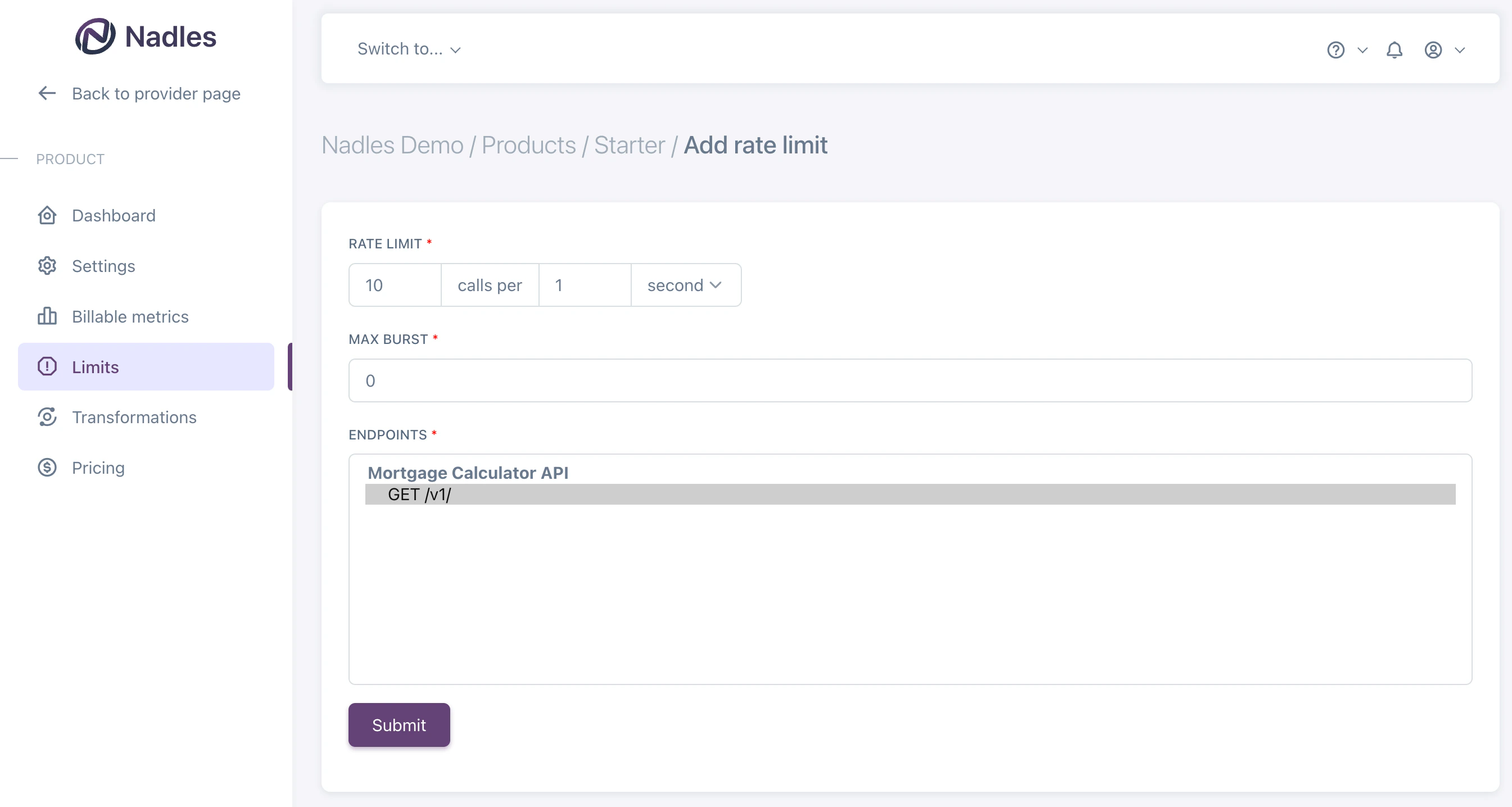 Rate limits can be applied to several endpoints. In that case, the rate limit will be shared by the selected of endpoints.
The endpoints can be from different APIs, the rate limit will work regardless.
## Set max burst
Max burst is the maximum number of HTTP requests that can be sent all at once without waiting.
It represents the largest “burst” of requests allowed by the system and is useful to allow short spikes in customer traffic.
We highly recommend setting max burst for your rate limits.
Defining rate limits without max burst may result in poor customer experience due to overly strict rate limiting that blocks *any* spikes in traffic.
**🔹 What Is "Max Burst" in Simple Terms?**
Suppose a server lets a client send:
**5 HTTP requests per second** on average, but also allows **short bursts** of traffic above that rate.
This is where max burst comes in.
**🔹 Max Burst Explained**
Max burst is the maximum number of requests your client is allowed to send all at once, even if that’s more than the usual allowed rate.
For example:
Rate limit: **5 requests per second**
Max burst: **20 requests**
This means your app can **send up to 20 requests instantly, but only occasionally**.
**🔹 What Happens After a Burst?**
If your app sends **20 requests at once**, that's fine — **but only once** in that short period.
After that:
Your rate is **above the allowed 5 per second**,
so the server will block or delay any new requests
until your average rate goes back down to the allowed level.
In simple terms:
> **You will be blocked from sending more requests until enough time has passed to “cool down” the rate.**
**🔹 Visual Example**
You're allowed to send **5 requests per second**,
but you’re also allowed to send up to **20 requests at once** — that’s your **max burst**.
Here's what happens:
**1. At 0 seconds:**
You send **20 requests all at once** — that’s okay, you’re using your max burst.
**2. What now?**
You’ve just used up what you'd normally send over 4 seconds (because 5 requests per second × 4 seconds = 20 requests).
**3. So you need to wait:**
You must now **wait at least 4 full seconds** before sending any more requests,
or the server will block or delay your next ones.
**4. If you wait less than 4 seconds (like 2 or 3):**
The server will see that you're going over the allowed rate,
and it will start rejecting or slowing down your requests.
**✅ Summary**
After sending a **burst of 20 requests**,
you must **wait 4 seconds** before sending more,
so your average request rate stays within the allowed **5 per second**.
Rate limits can be applied to several endpoints. In that case, the rate limit will be shared by the selected of endpoints.
The endpoints can be from different APIs, the rate limit will work regardless.
## Set max burst
Max burst is the maximum number of HTTP requests that can be sent all at once without waiting.
It represents the largest “burst” of requests allowed by the system and is useful to allow short spikes in customer traffic.
We highly recommend setting max burst for your rate limits.
Defining rate limits without max burst may result in poor customer experience due to overly strict rate limiting that blocks *any* spikes in traffic.
**🔹 What Is "Max Burst" in Simple Terms?**
Suppose a server lets a client send:
**5 HTTP requests per second** on average, but also allows **short bursts** of traffic above that rate.
This is where max burst comes in.
**🔹 Max Burst Explained**
Max burst is the maximum number of requests your client is allowed to send all at once, even if that’s more than the usual allowed rate.
For example:
Rate limit: **5 requests per second**
Max burst: **20 requests**
This means your app can **send up to 20 requests instantly, but only occasionally**.
**🔹 What Happens After a Burst?**
If your app sends **20 requests at once**, that's fine — **but only once** in that short period.
After that:
Your rate is **above the allowed 5 per second**,
so the server will block or delay any new requests
until your average rate goes back down to the allowed level.
In simple terms:
> **You will be blocked from sending more requests until enough time has passed to “cool down” the rate.**
**🔹 Visual Example**
You're allowed to send **5 requests per second**,
but you’re also allowed to send up to **20 requests at once** — that’s your **max burst**.
Here's what happens:
**1. At 0 seconds:**
You send **20 requests all at once** — that’s okay, you’re using your max burst.
**2. What now?**
You’ve just used up what you'd normally send over 4 seconds (because 5 requests per second × 4 seconds = 20 requests).
**3. So you need to wait:**
You must now **wait at least 4 full seconds** before sending any more requests,
or the server will block or delay your next ones.
**4. If you wait less than 4 seconds (like 2 or 3):**
The server will see that you're going over the allowed rate,
and it will start rejecting or slowing down your requests.
**✅ Summary**
After sending a **burst of 20 requests**,
you must **wait 4 seconds** before sending more,
so your average request rate stays within the allowed **5 per second**.